
アプリケーションギャラリには電気, 構造, 音響, 流体, 熱および化学分野に関連する COMSOL Multiphysics® チュートリアルおよびデモアプリファイルが用意されています. これらの例はチュートリアルモデルまたはデモアプリファイルとそれに付随する手順をダウンロードすることにより独自のシミュレーション作業の開始点として使用できます.
クイック検索機能を使用して専門分野に関連するチュートリアルやアプリを検索します. MPHファイルをダウンロードするには, ログインするか, 有効な COMSOL ライセンスに関連付けられている COMSOL Access アカウントを作成します. ここで取り上げた例の多くは COMSOL Multiphysics® ソフトウェアに組み込まれ ファイルメニューから利用できるアプリケーションライブラリからもアクセスできることに注意してください.

A model of a thermal microactuator requires the coupled simulation of electric current conduction with heat generation, heat conduction, and structural stresses and strains due to thermal expansion. The purpose of this model is to demonstrate how to access the cluster computing ... 詳細を見る


This tutorial model of the Joule heating effect in a busbar demonstrates how to synchronize geometry between the AutoCAD® software and the COMSOL Multiphysics® software, how to modify the geometry from COMSOL Multiphysics®, and how to run a geometric parametric ... 詳細を見る

This tutorial analyzes the resistive heating (Joule heating) of a busbar assembly designed to conduct a direct current from a current source to the anode in an electrolysis process. 詳細を見る

This tutorial model of the Joule heating effect in a busbar demonstrates how to synchronize an assembly between the SOLIDWORKS® software and the COMSOL Multiphysics® software, how to modify the geometry from COMSOL Multiphysics®, and how to run a geometric ... 詳細を見る

This tutorial model of the Joule heating effect in a busbar demonstrates how to synchronize an assembly between the Solid Edge® software and the COMSOL Multiphysics® software, how to modify the geometry from COMSOL Multiphysics®, and how to run a geometric ... 詳細を見る
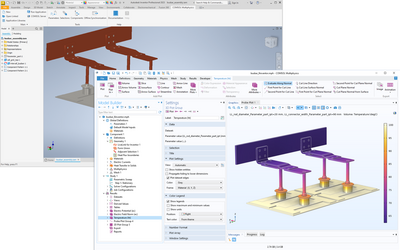
This tutorial model of the Joule heating effect in a busbar demonstrates how to synchronize an assembly between the Inventor® software and the COMSOL Multiphysics® software, how to modify the geometry from COMSOL Multiphysics®, and how to run a geometric parametric ... 詳細を見る

This tutorial model of the Joule heating effect in a busbar demonstrates how to synchronize an assembly between the PTC Creo Parametric™ software and the COMSOL Multiphysics® software, how to modify the geometry from COMSOL Multiphysics®, and how to run a ... 詳細を見る

This app demonstrates the following: Geometry parts and parameterized geometries Using tables for user input parameters Visualization on a 2D cross-section of a 3D geometry Improved visualization and user experience when a geometry object (the air object) is hidden. Induction heating ... 詳細を見る



