
Problem Description
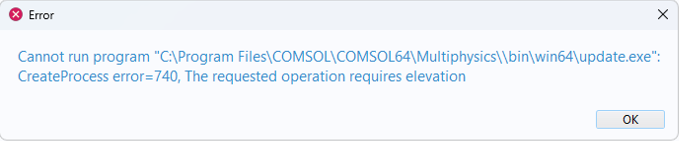
After going to File > Help > Check for Product Updates I get the following error
Solution
This issue seems to arise from a Windows Security update. There are two suggested workarounds
Launch COMSOL Multiphysics with administrator privileges.
To do this, right-click on your COMSOL Multiphysics shortcut and select Run as Administrator
When the program has opened go to File > Help > Check for Product Updates to start the update process.
Launch the update executable directly.
To do this, go to the COMSOL Multiphysics 6.4 > COMSOL Launchers directory on the Start menu. From the COMSOL Launchers directory, run the shortcut called Update. If you use an older version than 6.4, go to the corresponding COMSOL Launchers directory.
COMSOL は, 本ページに掲載されている情報の確認に合理的な努力を払っております. リソースおよびドキュメントは情報提供のみを目的としており, COMSOL はその有効性について明示的または黙示的な保証を行いません. 開示されたデータの正確性について, COMSOL は法的責任を負いません. 本文書で言及されている商標はすべて, それぞれの所有者に帰属します. 商標に関する詳細は, 製品マニュアルをご参照ください.


